
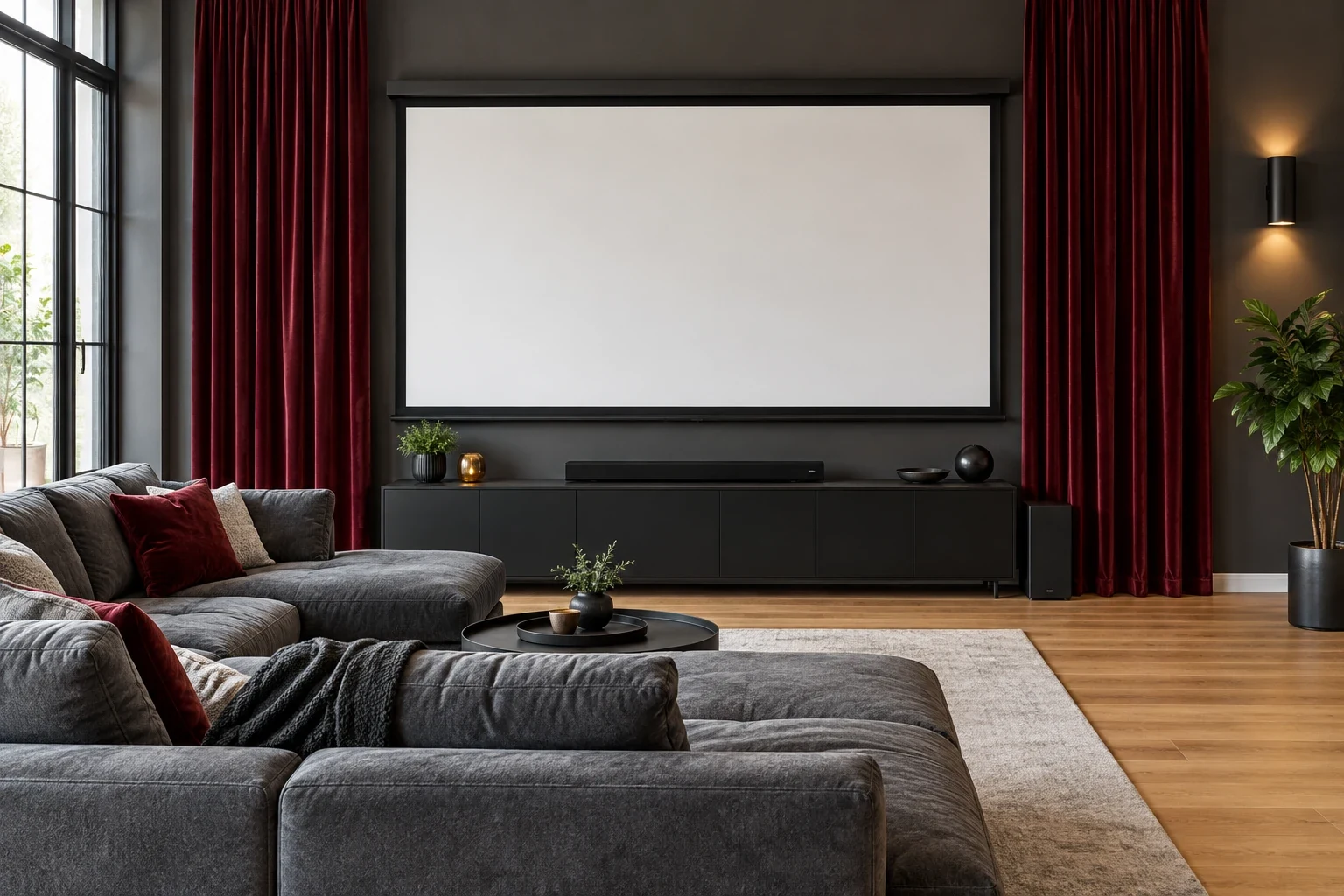
Sun glare on the screen and stiff chairs ruin the experience of watching films at home. Updating a movie and gaming room requires installing blackout window treatments, adding deep cushions, and setting up colored LED accent lighting to fix the space.
Frame with Drapes

Hang heavy velvet curtains on either side of your viewing area. Thick fabric absorbs excess sound bouncing off hard walls and blocks light leaks from the edges of the room. Buy panels that measure at least 96 inches long so they reach the floor. Mount the curtain rod two inches below the ceiling line to cover the entire vertical space. Deep burgundy velvet adds a classic theater texture while keeping the room dark.
Hang a Big Screen

Mount a fixed-frame projector screen flat against the front wall. A dedicated screen reflects light evenly, providing a sharper picture than a bare painted surface. Choose a screen with a 120-inch diagonal measurement for a standard twelve-foot wall. Secure the aluminum frame directly into the wall studs using heavy-duty anchors. Keep the center of the white material at eye level when you sit down, usually about 42 inches off the floor.
Add Wall Sconces

Mount matte black sconces along charcoal walls to improve visibility without washing out the picture. Wall fixtures cast light downward along the paint instead of directing beams forward, which keeps contrast sharp on your screen. Space the fixtures six feet apart along the side walls and position each base 60 inches above the trim. Wire the lights into a wall dimmer switch so you can dial down the illumination right before the main feature starts. Choose fixtures with a flat matte finish to prevent stray reflections while watching movies.
Place a Sectional

Bring in a large sectional sofa as main seating for the center of the floor. Deep cushions give everyone room to stretch out their legs during a three-hour feature. Look for a configuration that measures at least 110 inches wide to fit four adults comfortably. Charcoal gray fabric hides accidental snack spills better than lighter materials. Position the front edge of the sofa about eight feet away from the screen for optimal viewing angles.
Set a Low Console

Slide a short media cabinet directly underneath the center of your screen. A low profile keeps your equipment organized without blocking the bottom edge of the projected image. Pick a unit that stands no taller than 24 inches from the floor. A matte black finish blends into the shadows when the room goes dark. Drill a two-inch hole in the back panel to route all your HDMI and power cables out of sight.
Paint Walls Charcoal

Roll a dark gray paint over the walls and trim. Dark matte colors absorb stray light from the projector, keeping the room dim and focusing all attention on the screen. Buy two gallons of high-quality acrylic latex paint in a flat finish. Avoid eggshell or satin formulas, as the slight gloss will reflect the bright scenes back into the room. Apply two coats with a thick three-eighths-inch nap roller to get solid, even coverage.
Drape a Warm Throw

Keep a few thick throw blankets folded over the arms of your seating. Basements and dedicated media spaces often feel chilly when the air conditioning runs, and heavy fabrics offer quick warmth. Select a chunky knit material measuring 50 by 70 inches to cover an adult fully. A deep burgundy color ties into the classic theater palette while masking minor stains. Wash the fabric on a cold cycle every month to maintain the soft texture.
Install Recessed Lights

Put small spotlight fixtures directly into the ceiling above the seating area. Overhead lighting provides necessary illumination for cleaning the room or finding lost remotes without cluttering the floor with lamps. Cut four-inch holes in the drywall and wire the housings to an independent circuit. Use matte black trim rings inside the fixtures to cut down on glare. Insert warm 2700K LED bulbs to keep the space feeling relaxed rather than clinical.
Run Amber LED Strips

Attach colored LED accent lighting behind your media shelves. The subtle backlight highlights your physical media collection while keeping the overall room dark enough for comfortable viewing. Buy a 16-foot spool of adhesive light strips for about twenty dollars. Peel the backing and press the tape along the rear edge of a matte black floating shelf. Set the controller to a warm amber tone to match the cozy atmosphere of the room.
Add Leather Recliners

Line up a row of adjustable chairs against the back wall. Dedicated theater seats provide firm back support and individual armrests for viewers who prefer their own space. Leave at least 24 inches of clearance behind the chairs so the backs can recline fully. Choose warm amber leather upholstery, which wipes clean with a damp cloth if someone drops a drink. Built-in matte black cup holders keep beverages secure during tense action scenes.
Set Up a Snack Table

Place a compact end table right next to the main sofa. A flat surface keeps popcorn bowls and drinks within reach, preventing people from leaning forward and blocking the view. Pick a matte black metal table that measures about 18 inches square. Keep the height roughly equal to the sofa arm so viewers can grab snacks without looking away from the film. Set out a couple of glass bowls and a folded burgundy napkin for easy serving.
Build Open Shelving

Construct built-in storage alcoves along the side walls. Open shelves keep your physical media organized and visible without requiring extra floor space for standalone bookcases. Use three-quarter-inch plywood to build the frame, spacing the horizontal boards 10 inches apart to fit standard cases. Paint the entire unit matte black to match the room’s dark profile. Leave one shelf partially empty to display a warm amber glass vase or a small piece of decor.
Mount a Projector

Secure your projection equipment to the ceiling at the back of the room. Hanging the unit overhead keeps the noisy cooling fan away from your ears and removes the risk of someone walking in front of the lens. Screw a heavy-duty steel bracket directly into a ceiling joist using three-inch lag bolts. Attach a matte black projector to the mount, ensuring the lens aligns with the top third of your screen. Route the power cord through a plastic conduit to keep the ceiling tidy.
Wipe down your projector lens with a microfiber cloth every few months to keep the picture crisp. Vacuum the velvet curtains twice a year to stop dust from settling into the heavy fabric.
